






 AI Development
 Agentic AI Development
 AI-Product-Engineering
 Generative AI Development
 AI Chatbot Development
 RAG Development
 AI MCP Development
 n8n Automation Development
 AI Consulting
Piccosoft

Picco Labs
Picco AI
Piccosoft

OCR & Document Intelligence
Extract, Read, and Understand Information from Documents with AI
Transform scanned documents, images, PDFs, and printed content into searchable, structured, and actionable digital information using intelligent OCR and AI-powered document understanding.Piccosoft builds OCR and document intelligence solutions that help businesses automate text extraction, understand document content, process complex layouts, and convert unstructured information into usable business data.
Implement AI Where It Creates Real Business Value
Why Businesses Struggle to Implement AI
From Business Requirements to AI Implementation
What We Deliver
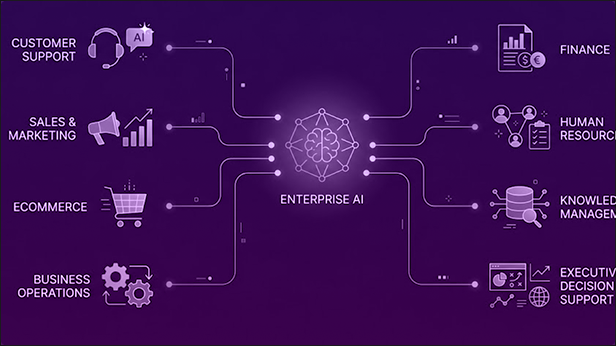
Where Can Your Business Implement AI?
Technologies That Power Our AI Solutions
Connect AI with Your Existing Business Ecosystem
Why Businesses Choose Piccosoft
Build a More Intelligent and Efficient Business
Frequently Asked Questions
Overview
Businesses receive information through invoices, forms, contracts, reports, certificates, scanned records, images, and digitally generated documents. Much of this information remains difficult to process because it is stored in formats that cannot be directly understood by business applications.
At Piccosoft, we develop OCR and document intelligence solutions that combine text recognition, AI-based interpretation, document processing pipelines, and business system integration. Traditional OCR systems convert images into text. Modern OCR and AI document intelligence solutions go further by understanding document structures, identifying relevant information, recognizing fields, extracting tables, and making document content available for downstream applications. Our solutions help organizations turn document-based information into digital data that can be searched, analyzed, validated, and used within their operational workflows.
Identify AI Opportunities
Discover where AI can create meaningful improvements across your business. Prioritize use cases based on business value, feasibility, and expected impact.
Automate Business Processes
Reduce repetitive manual work through intelligent workflow automation. Help teams focus on higher-value activities and operational responsibilities.
Integrate AI with Existing Systems
Connect AI capabilities with applications, APIs, and databases. Enable intelligent workflows without replacing your entire technology environment.
Improve Knowledge Access
Make business information easier to search, understand, and use. Connect AI with documents, databases, and internal knowledge sources.
Build AI Applications
Develop custom AI applications, assistants, and intelligent business solutions. Design experiences around specific users, processes, and organizational requirements.
Create an AI Roadmap
Plan AI adoption through practical and achievable implementation stages. Start with focused use cases and expand capabilities as your business grows.
Business Challenges
Organizations dealing with large volumes of documents often face challenges beyond simply digitizing information.

Manual Data Entry
Employees spend significant time entering information from scanned documents and images into business systems.
Read more

Unsearchable Documents
Scanned PDFs and image-based files cannot be easily searched or analyzed.
Read moreComplex Document Layouts
Tables, columns, headers, footers, checkboxes, and handwritten information make extraction difficult.
Read moreInconsistent Document Formats
Similar documents arrive in different layouts, templates, formats, and quality levels.
Read moreData Extraction Errors
Traditional OCR may misinterpret characters, numbers, symbols, or field values.
Read moreMultilingual Content
Documents containing multiple languages or regional scripts require specialized recognition capabilities.
Read moreOur OCR & Document Intelligence Approach
Piccosoft follows a practical engineering approach to building OCR and document intelligence solutions based on your document types, extraction requirements, and business workflows.
Document Input & Acquisition
Capture documents from scanned files, PDFs, photographs, uploaded images, email attachments, and connected systems.
Image Preprocessing
Improve document readability through image cleanup, deskewing, noise reduction, contrast adjustment, cropping, and orientation correction.
OCR & Text Recognition
Extract machine-readable text from scanned documents, images, screenshots, and PDF files.
Intelligent Document Layout Recognition
Understand the arrangement and structure of content within complex documents, including tables, sections, columns, and form layouts.
Table Extraction
Extract structured information from tables while preserving rows, columns, relationships, and data values.
Key-Value Extraction
Identify and extract specific fields such as invoice numbers, dates, customer details, totals, tax values, document IDs, and other relevant information.
OCR & Document Intelligence Capabilities
OCR Text Extraction
Extract machine-readable text from scanned documents, images, screenshots, and PDF files.
Intelligent Document Layout Recognition
Understand the arrangement and structure of content within complex documents, including tables, sections, columns, and form layouts.
Table Extraction
Extract structured information from tables while preserving rows, columns, relationships, and data values.
Key-Value Extraction
Identify and extract specific fields such as invoice numbers, dates, customer details, totals, tax values, document IDs, and other relevant information.
Multilingual OCR
Build document processing solutions for documents containing multiple languages and supported regional scripts.
Handwriting Recognition
Process supported handwritten content from forms, records, applications, and other documents.
Document Classification
Identify document types and categorize incoming files based on their content and characteristics.
AI-Powered Content Interpretation
Use AI to understand document meaning, summarize content, identify important information, and transform extracted text into structured outputs.
OCR & Document Intelligence Use Cases
1. Invoice & Financial Document Extraction
Extract invoice numbers, vendor information, line items, tax values, totals, payment details, and financial information.
2. Business Forms Processing
Read applications, registration forms, customer onboarding forms, questionnaires, and structured forms.
3. Contract & Agreement Intelligence
Extract clauses, parties, dates, obligations, reference details, and relevant information from business agreements.
4. Identity & Certificate Processing
Read information from supported identification documents, certificates, licenses, and official records.
5. Healthcare Document Digitization
Process medical forms, reports, prescriptions, records, and other healthcare documents according to application requirements.
6. Logistics & Shipping Documents
Extract information from bills of lading, packing lists, shipping documents, delivery records, and logistics forms.
Technology & Integration
Organize and connect business knowledge through AI-powered systems. Help employees discover information and access organizational knowledge.
Infrastructure
Integration Capabilities
OCR and document intelligence become more valuable when extracted information can automatically flow into business applications.
CRM Integration
Connect AI with CRM platforms and customer data. Support intelligent lead management, customer insights, and sales workflows.
ERP Integration
Integrate AI with ERP systems and business processes. Enable intelligent access to operational, financial, and organizational information.
Ecommerce Integration
Connect AI with ecommerce platforms, product catalogs, and order systems. Support intelligent shopping experiences, automation, and commerce operations.
Database Integration
Connect AI applications with structured business databases and data sources. Enable intelligent querying, retrieval, and data-driven workflows.
Document & Knowledge Integration
Integrate AI with documents, knowledge repositories, and internal information. Enable intelligent search, document understanding, and knowledge retrieval.
API & MCP Integration
Connect AI applications with APIs, tools, and business capabilities. Enable controlled access to services and workflows through APIs and MCP.
Communication Platform Integration
Integrate AI with communication and collaboration platforms. Support automated responses, employee assistance, and conversational workflows.
Workflow Automation Integration
Connect AI with existing automation tools and business processes. Enable intelligent task execution, routing, and workflow coordination.
Monitoring & Analytics
Connect AI implementations to usage tracking, performance monitoring, and outcome analytics.
Security & Compliance
Integrate AI systems with organizational security controls, data protection policies, and relevant regulatory requirements.
Why Businesses Choose Piccosoft
Piccosoft combines business understanding, software engineering, and modern AI capabilities. We focus on practical solutions that integrate with existing technology environments.

Business-Focused Implementation
We design OCR solutions around the information your business needs to capture and the processes that depend on it.

Beyond Basic OCR
Our engineering approach combines text recognition, layout understanding, AI interpretation, structured extraction, and system integration.

Custom Document Processing
We adapt extraction pipelines for your document types, formats, fields, layouts, and business rules.

AI & Application Engineering Expertise
We combine AI technologies with software engineering, APIs, databases, and enterprise application development.

Integration-Ready Architecture
Extracted data can be connected to existing applications, workflows, and operational systems.

Flexible Deployment
Solutions can be designed for cloud environments, private infrastructure, or deployment models based on your requirements.
Human Review Where Needed
We design validation and review mechanisms for documents or fields that require additional confidence or business approval.
Improved Operational Efficiency
Automate repetitive tasks and streamline business workflows. Help teams complete daily activities with less manual effort.
Faster Access to Information
Connect AI with relevant business data and knowledge sources. Help employees find and understand information more quickly.
Better Customer Experiences
Enable faster and more personalized customer interactions. Improve support, engagement, and service delivery.
Increased Employee Productivity
Provide AI assistants and automation tools for everyday work. Allow employees to focus on valuable and strategic activities.
Connected Business Processes
Integrate AI across applications, data sources, and workflows. Create more connected and intelligent business operations.
Scalable AI Adoption
Build an AI foundation for future use cases and expansion. Grow AI capabilities gradually based on business priorities.
Frequently Asked Questions
AI implementation includes strategy, solution design, development, integration, and deployment. The exact scope depends on business requirements and selected use cases.
CRM development is the process of designing and building software that helps businesses manage customer relationships, sales activities, marketing campaigns, and customer support.
CRM development is the process of designing and building software that helps businesses manage customer relationships, sales activities, marketing campaigns, and customer support.
CRM development is the process of designing and building software that helps businesses manage customer relationships, sales activities, marketing campaigns, and customer support.
CRM development is the process of designing and building software that helps businesses manage customer relationships, sales activities, marketing campaigns, and customer support.
CRM development is the process of designing and building software that helps businesses manage customer relationships, sales activities, marketing campaigns, and customer support.
CRM development is the process of designing and building software that helps businesses manage customer relationships, sales activities, marketing campaigns, and customer support.
CRM development is the process of designing and building software that helps businesses manage customer relationships, sales activities, marketing campaigns, and customer support.
Timelines vary by scope, but a focused pilot can often launch within weeks, with broader rollout phased over several months. Starting with one high-value process allows the business to see measurable results early, before expanding to additional areas.